Introduction
This article builds on the concepts covered in the Understanding Rack article. Previously, we explored the Rack protocol, middleware, and the request-response cycle by building a simple Rack application. Now, we'll see how middleware is used in Rails. If you're new to Rack, consider reading the previous article first.
Let's start. Rails is a web application framework which follows Rack protocol. It uses Rack middleware to handle various aspects of the request-response cycle, such as logging, session management, and security.
Middleware acts like a checkpoint in the request-response pipeline. Requests pass through a series of checkpoints before reaching the application, and responses pass through them again before being returned to the client. At each checkpoint, middleware can inspect, modify, or even halt the request-response cycle.
In this article, we will learn how to write custom and third-party middleware in Rails and how to configure them in our application. Since Rails is built on top of Rack, it is itself a Rack application. Its entry point is the config.ru file, where Rails.application — a Rack-compliant object — is handed off to the Rack server to begin handling requests.
# config.ru
require_relative "config/environment"
run Rails.application
Rails.application.load_server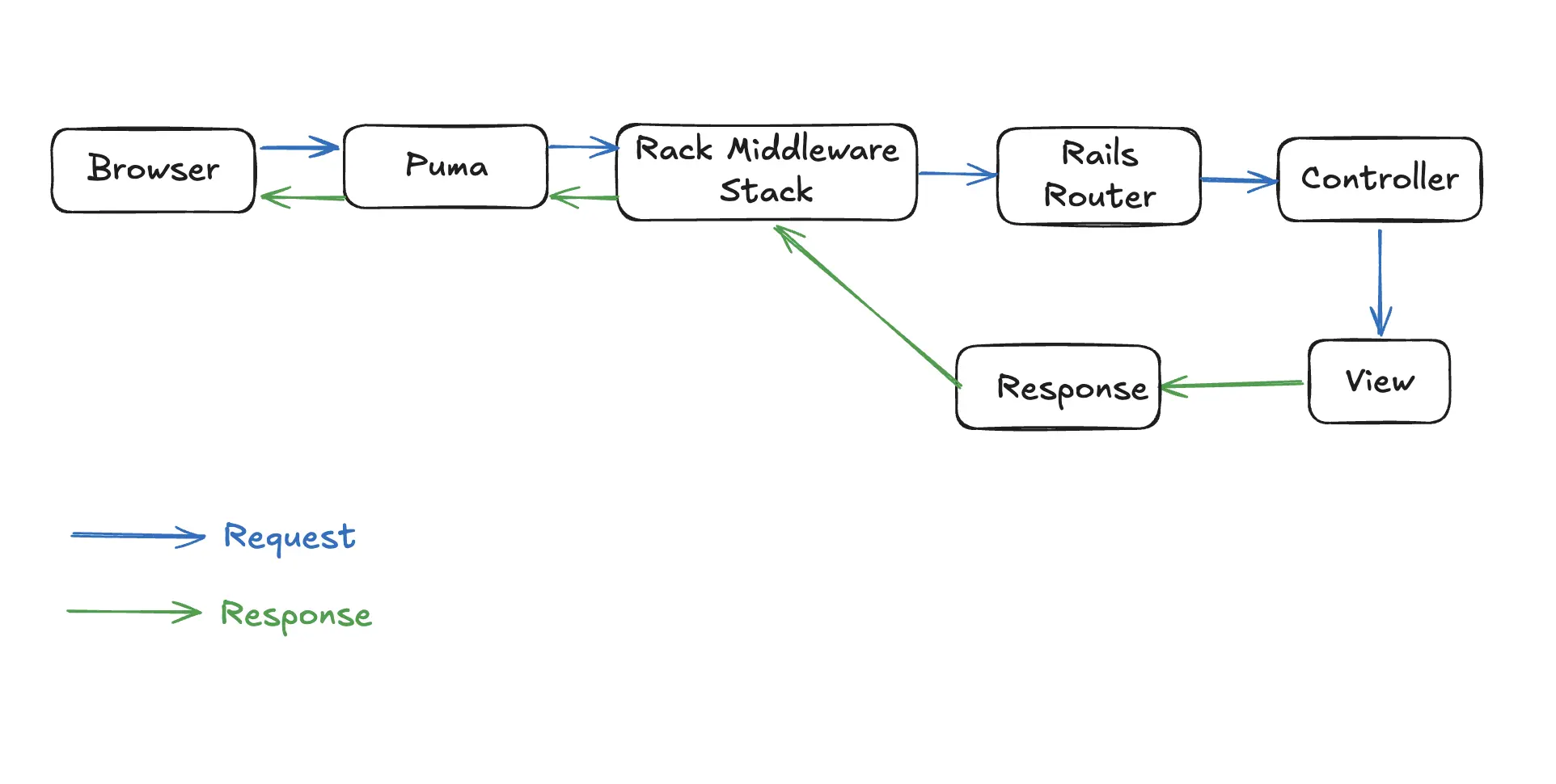
Rails uses middleware extensively to process requests before they reach controllers.
Why use Middleware
Middleware is a good choice when we need to write logic that is separate from our main application and that deals with request and response.
For example:
- Logging requests
- Authentication checks
- Rate limiting
- Adding security headers
- Measuring response time
A good rule of thumb: if it needs to run on every request or response — regardless of which endpoint is hit — middleware is probably the right fit.
Middleware Stack in Rails
Rails has a default middleware stack that includes various middleware components. We can see the list of middleware in a Rails application by running the following command:
$ bin/rails middlewareThis command displays the middleware stack in the order in which they are executed. The middleware stack in Rails includes components for handling sessions, cookies, logging, and more.
The output look something like this:
use ActionDispatch::HostAuthorization
use Rack::Sendfile
use ActionDispatch::Static
use ActionDispatch::Executor
use ActionDispatch::ServerTiming
use ActiveSupport::Cache::Strategy::LocalCache::Middleware
use Rack::Runtime
use Rack::MethodOverride
use ActionDispatch::RequestId
use ActionDispatch::RemoteIp
.
.
.
The order of middleware is important as requests pass through the stack top-to-bottom, and responses travel back bottom-to-top.
Configuring Middleware Stack
In addition to middleware provided by Rails, we can also add custom middleware and Third party gem middleware.
We have already seen how to write a custom middleware in the previous article. Now, let's see how to add it to the Rails middleware stack.
Rails doesn't really care whether the middleware comes from our application or from a gem.
In both cases, we're adding a Rack-compatible middleware class to the middleware stack.
The difference is just where the middleware class is defined and how we reference it when adding it to the stack.
config.middleware
Rails provides config.middleware — a configuration interface for adding, removing, and reordering middleware in the stack.
Let's see how to use this interface to manage our middleware stack.
Adding a middleware
Rails has following methods to add a new middleware in the stack:
config.middleware.use(new_middleware, args)

config.middleware.insert_before(existing_middleware, new_middleware, args)

config.middleware.insert_after(existing_middleware, new_middleware, args)
Swaping a middleware
To swap existing middlewares, Rails provides following methods:
config.middleware.swap(middleware_1, middleware_2)
# Replace middleware_1 with middleware_2
Moving a middleware
Rails also provides methods to change the order or middleware in the stack. Let's see those methods.
config.middleware.move_before(middleware_1, middleware_2)
# Move middleware_2 to before middleware_1

config.middleware.move_after(middleware_1, middleware_2)
# Move middleware_2 to after middleware_1
Deleting a middleware
Rails also provides method to delete a middleware from the stack.
config.middleware.delete existing_middlewareAfter this if we inspect the middleware stack by running bin/rails middleware, we won't find this middleware.
Custom middleware
To add custom middleware to the Rails middleware stack, use config.middleware in config/application.rb. The .use method appends it to the end of the stack. For example, if we have a custom middleware called MyCustomMiddleware, we can add it to the stack like this:
# config/application.rb
module MyApp
  class Application < Rails::Application
    # Other configurations...

    # Add custom middleware to the stack
    config.middleware.use MyCustomMiddleware
  end
end
Third Party Middleware
In the case of a third party gem, the middleware class is provided by the gem itself. And the gem itself mentions the process of adding the middleware.
Again, we use the same config.middleware api to add third-party middleware in the stack and we can add this inside
config/application.rb file. But it is a poor organisation of code.
Why it is considered poor organization is because many middleware gems require configuration. Let's take an example of
Rack::Cors.
Rails.application.config.middleware.insert_before 0, Rack::Cors do
  allow do
    origins "*"
  end
end
This configuration is usually placed inside initializer folder. Rails doesn't prevent us to put it in config/applicaiton.rb file but soon it becomes a giant file full of unrelated configuration.
Instead, if we put it in initializers folder, each library gets its own configuration file. This is much easier to find and maintain the code.
Also Initializers are best place for them because, Initializers run after Rails and all gems are loaded, but before the app starts accepting requests. So any configuration that needs to be done for a gem should be done in an initializer.
At this point, Rails is fully loaded, Gems are available, environment specific settings are applied. This makes Initializers safe place to configure external gems.
Summary
- Rails is a Rack application.
- Requests pass through a middleware stack before reaching controllers.
- Middleware can inspect or modify requests and responses.
- Rails ships with many built-in middleware.
- We can add, remove, reorder, or replace middleware.
- Custom middleware can be added to the stack using
config.middlewareinconfig/application.rb. - Third-party middleware can also be added using
config.middleware, but it's best practice to place their configuration in theconfig/initializersfolder for better organization and maintainability.